Pricing Rules
Pricing rules on the appointable product Pricing tab adjust the booking total on top of the base product price, staff base costs, optional location and resource costs (Experimental), and add-ons.
How it works
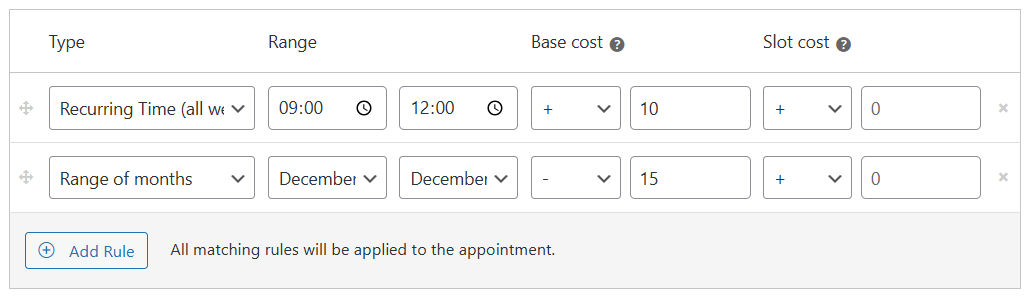
Each rule has a Base cost column (once per appointment when the rule matches) and a Slot cost column (per interval segment when the segment is fully inside the rule window). All matching rules apply unless a developer filter limits that.
What you need
- Appointable product with Custom pricing rules? enabled
- Product interval understood - slot segments use interval for products saved after 5.0.0 (see below)
You are ready when
- ✅ At least one pricing rule is saved on the product Pricing tab
- ✅ Storefront total changes when you pick a slot inside the rule window

How totals are built
At checkout, WC_Appointments_Cost_Calculation computes:
Appointment cost = Base total + Sum of slot costs per segment
Add-ons are added after this via the add-ons integration (not inside the pricing-rule loop).
| Component | Source | Applied |
|---|---|---|
| Product price | Product General tab | Once (in base total) |
| Staff base cost | Staff profile or product Staff row | Once per selected staff (in base total); signed costs allowed |
| Location cost | Product Locations tab (Experimental) | Once for the chosen venue; signed (negative = discount) |
| Resource cost | Product Resources tab (Experimental) | Once for the allocated room; signed |
| Rule base cost | Matching pricing rules | Once per rule when the rule matches |
| Rule slot cost | Matching pricing rules | Per segment fully inside the rule window |
| Add-ons | Product add-ons | After appointment cost is calculated |
Location, resource, and staff extras use add-on style brackets on the storefront (for example (+$5)). The appointment total still floors at zero.
Segment counting (minute/hour products)
| Product age | Segments | Slot cost applies |
|---|---|---|
| Saved after 5.0.0 (default) | ceil(duration ÷ interval) | Each interval segment separately |
| Saved before 5.0.0 (legacy) | Usually one segment per appointment | Once per appointment (or per day for multi-day) |
Example (modern product): 3-hour duration, 1-hour interval → 3 segments. A slot cost applies only to segments fully contained in the rule time window.
Base cost matching
| Product age | When rule base cost applies |
|---|---|
| Saved after 5.0.0 (default) | When any part of the segment overlaps the rule window |
| Saved before 5.0.0 (legacy) | When the segment is fully inside the rule window (same as slot cost) |
Each rule’s base cost applies at most once per appointment (first matching segment wins for that rule).
Per-slot prices on the calendar are a preview (WC_Appointment_Slots_Pricing). Checkout uses segment logic above and is authoritative. For single-interval bookings they usually match; long appointments can differ slightly on time rules.
Rule types (Pricing tab)
Match the admin Type dropdown:
| Type | UI label | Matches |
|---|---|---|
custom | Date range | Specific calendar dates |
months | Range of months | Months in range |
weeks | Range of weeks | ISO weeks in range |
days | Range of days | Weekdays in range |
time | Recurring time (all week) | Clock time every day |
time:range | Recurring time (date range) | Clock time on dates in span |
time:1 … time:7 | Monday … Sunday | Clock time on that weekday |
slots | Duration | Customer-selected duration in range |
quant | Quantity count | Booking quantity in range |
sessions | Appointments in package (5.4+, recurring only) | Billable session count at recurring checkout |
There is no staff pricing rule type - assign per-staff base cost on the staff profile, not on the Pricing tab.
Cost modifiers
Each Base cost and Slot cost cell has a modifier:
| Modifier | Base cost column | Slot cost column |
|---|---|---|
| + (default) | Add to running base total | Add to segment slot cost |
| − | Subtract | Subtract |
| × | Multiply running base total | (not in UI) |
| ÷ | Divide running base total | (not in UI) |
| = | Set running base total to this value | Set segment slot cost to this value |
= on base cost replaces the accumulated base total (product + staff + prior rule bases) - not add-ons.
Worked example
Product: $100 base · 3 h duration · 1 h interval (product saved after 5.0.0)
Staff: +$20 base cost
Rules:
| Rule | Base | Slot |
|---|---|---|
| Monday 14:00-16:00 | +$10 | +$5 |
| Recurring time 09:00-12:00 (all week) | - | +$15 |
Appointment: Monday 13:00-16:00 · add-ons $5
Three 1-hour segments: 13:00-14:00 · 14:00-15:00 · 15:00-16:00
| Line | Calculation |
|---|---|
| Product + staff | $100 + $20 = $120 |
| Rule base (Mon 14-16) | +$10 once (13:00-14:00 segment overlaps 14:00) |
| Slot cost (Mon 14-16) | +$5 × 2 (14:00-15:00 and 15:00-16:00 fully inside rule; 13:00-14:00 is not) |
| Peak 09-12 slot rule | $0 (no segment fully inside 09:00-12:00) |
| Subtotal | $140 |
| Add-ons | +$5 |
| Total | $145 |
Appointments in package (5.4+)
On a recurring-enabled product, Appointments in package adjusts the package subtotal at recurring checkout (after per-session costs are summed):
| Field | Purpose |
|---|---|
| From / To | Billable session count range (e.g. 8-12 sessions) |
| Base cost + modifier | Applied to package subtotal - slot cost column is ignored |
- First matching rule wins for the package total
- − (or empty modifier with a cost) multiplies the cost by billable session count per plugin logic
- Per-session time/date rules may still apply before the package rule runs
See Recurring packages - Package pricing.
Related
- Appointable product - pricing
- Recurring packages
- Staff - per-staff base costs (not a pricing rule type)