Shortcodes
Use shortcodes when the block editor is unavailable (classic editor, page builders, custom templates).
Before you begin
How it works
[appointment_form] renders the booking form for one appointable product. [product_page] embeds the full WooCommerce product layout including the form.
What you need
- Product ID or SKU of an appointable product
- Availability rules so slots appear on the embedded form
Product page shortcode
Full product page (template + booking form) anywhere:
[product_page id="99"]
[product_page sku="FOO"]
Use inside posts, tabs, or page-builder HTML widgets.
Appointment form shortcode
Form only - without the rest of the product template:
[appointment_form id="99"]
Attributes
| Attribute | Default | Description |
|---|---|---|
id | Required | Appointable product ID |
sku | - | Use SKU instead of id |
show_title | 1 | Show product title |
show_price | 1 | Show price |
show_rating | 1 | Show star rating |
show_excerpt | 1 | Show excerpt |
show_meta | 1 | Show product meta |
show_sharing | 1 | Show sharing links |
availability_autoselect | - | Auto-select first available slot (1 or 0) |
Removed in 5.3.11
The customer_timezones attribute is deprecated and has no effect. Timezone support is site-wide - Timezones.
Example
[appointment_form id="123" show_title="0" availability_autoselect="1"]
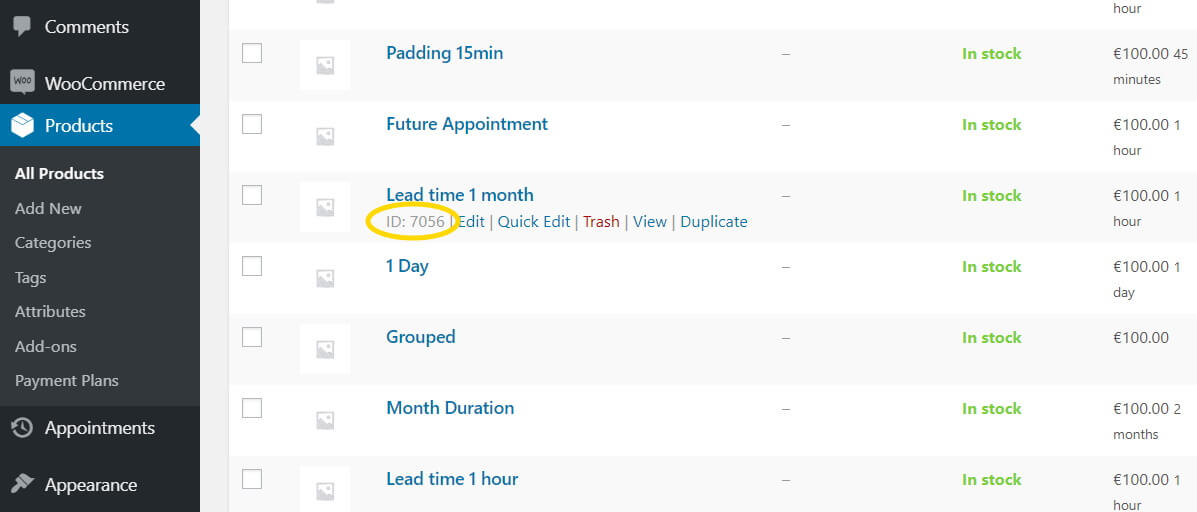
Find the product ID
Numeric ID from Products list (hover row for ID in admin URL or tooltip).
Related
- Appointment Form block
- Page builders - Elementor and others
- Customer booking process