Roles & Capabilities
WooCommerce Appointments uses WordPress roles plus a granular staff permissions system (5.2.0+) to control who can view, create, and change appointments.
Before you begin
How it works
Administrators and Shop managers have full access. Shop staff see only their assigned appointments by default - fine-tuned with permissions that drive the Staff portal.
Where to configure
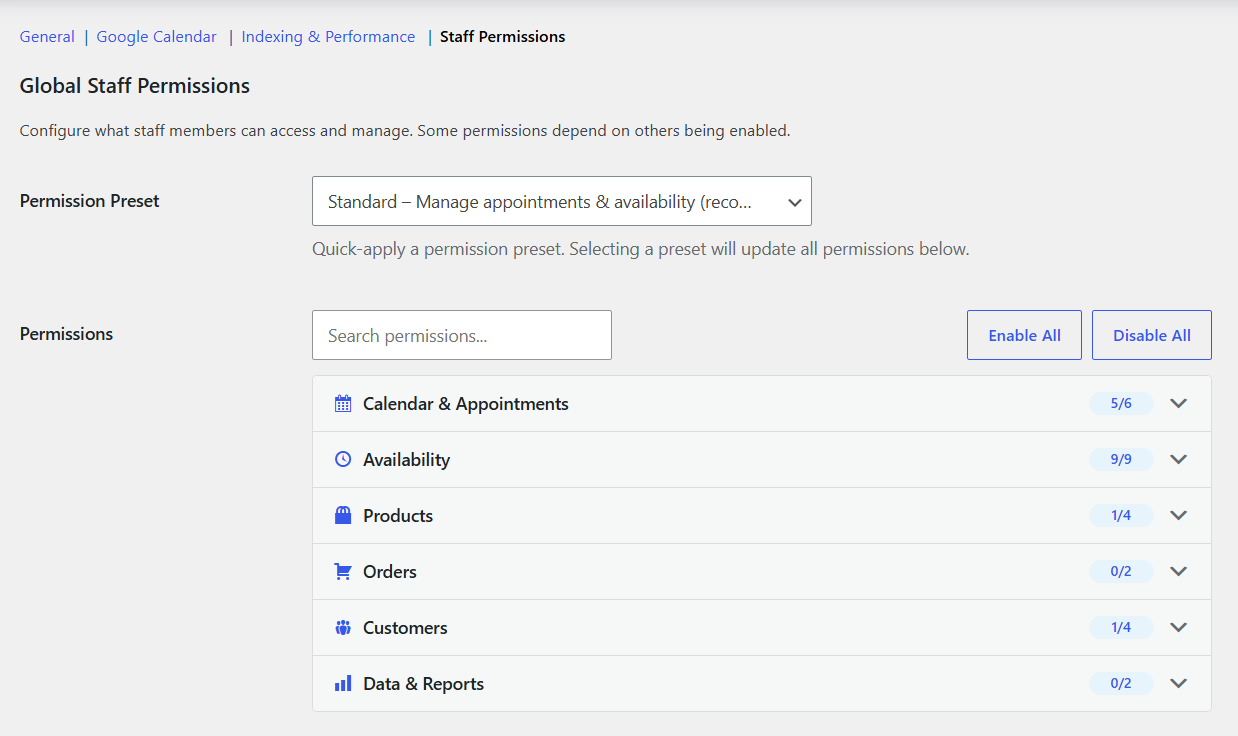
- Global defaults: WooCommerce → Settings → Appointments → Staff Permissions
- Per staff: edit the user profile → permission overrides
Roles
Administrator / Shop manager
Full access:
- Any appointment - create, edit, cancel
- All products, staff, and settings
- Availability hub (all layers) and Google Calendar
Shop staff
Scoped to assigned appointments by default:
- View and manage own appointments
- Own availability and Google Calendar sync
- Cannot access other staff's appointments or global settings unless permissions allow
Exact access is set in Staff permissions.
WordPress capabilities
| Capability | Granted to | Purpose |
|---|---|---|
manage_appointments | Administrator, Shop manager, Shop staff | Access appointments |
manage_others_appointments | Administrator, Shop manager | Appointments assigned to other staff |
Shop staff also receive wc_appointment post-type caps and edit_shop_orders where applicable.
Staff permissions
Configure globally or per user.
Calendar and appointments
| Permission | Default | Description |
|---|---|---|
| View Calendar | ✅ | Calendar for assigned appointments |
| View Appointments List | ✅ | List filtered to their appointments |
| Change Appointment Status | ✅ | Confirm, complete, update status |
| Create Appointments | ❌ | Create from calendar (assigned products) |
| Create Appointments for Any Product | ❌ | Create for other staff or unassigned products |
| Cancel Appointments | ❌ | Cancel (may trigger refunds) |
Availability (Appointments → Availability)
| Permission | Default | Description |
|---|---|---|
| Manage Own Availability | ✅ | Personal Open hours and Unavailable (Save stays on Staff). Staff can still browse General and assigned product / location / resource rules read-only |
| Manage General Availability | ❌ | Store-wide General layer |
| Manage Product Availability | ❌ | Product layer |
| Manage Location Availability | ❌ | Venue layer (Locations & rooms beta) |
| Manage Resource Availability | ❌ | Room/equipment layer (same beta) |
| Set Available / Unavailable | ✅ | Add Open hours; without it, staff may only add closed dates |
| Rule Type: Date Range with Time | ✅ | Extra rule types beyond basic date range |
| Rule Type: Recurring (Months / Weeks / Days) | ✅ | Month / week / weekday recurring types |
| Rule Type: Time Ranges | ✅ | Recurring time rule types |
Products, locations, rooms
| Permission | Default | Description |
|---|---|---|
| View Assigned Products | ✅ | Products they are assigned to |
| View Product Details | ✅ | Pricing, duration, capacity |
| Create & Edit Products | ❌ | Create or edit appointable products |
| Manage Locations | ❌ | Create/edit venues (beta); Full preset includes this |
| Manage Rooms & Resources | ❌ | Create/edit rooms and equipment (beta) |
Customers
| Permission | Default | Description |
|---|---|---|
| View Customers | ❌ | Customers from their appointments |
| View All Customers | ❌ | All customers, not just own |
| View Customer History | ❌ | Past bookings per customer |
| Contact Customers | ❌ | Email and phone for direct contact |
Orders
| Permission | Default | Description |
|---|---|---|
| View Orders | ❌ | Orders linked to their appointments |
| Create & Edit Orders | ❌ | Create or edit orders |
Data and reports
| Permission | Default | Description |
|---|---|---|
| View Earnings | ❌ | Revenue from their appointments |
| Export Appointments | ❌ | CSV or ICS export |
Permission presets
- Minimal - calendar and list only
- Standard - calendar, status, create, availability, products, customers
- Full - all permissions
tip
Start with Standard and adjust per staff on their profile.
Permission dependencies
- Status changes, create, and cancel require View Calendar
- Create for any product requires Create Appointments
- View product details requires View Assigned Products
- Customer history, all customers, and contact require View Customers
Staff portal
Permissions control what appears in the Staff portal - dashboard widgets, menu items, admin bar links, and quick actions.
Related
- Staff - assign staff to products
- Staff portal - staff admin experience
- Admin appointment panel - create and edit appointments